How it works
Three parts, and you already own one of them
An app to talk in, an agent to do the work, and a computer for it to work on.
One
Desk is where you talk
The app on your phone and your computer: Android, iPhone, Mac and Linux. Type or speak, attach a photo or a document, and read the reply or have it read to you. The same conversations are on every device you sign in on.

Two
Your agent does the work
An agent is an AI that can act, not just answer. It runs as a small program on a computer, and it uses that computer the way you would: it reads and writes files, keeps notes, runs the tools you have installed and comes back to tell you what it did. Anything a computer can do, it can help with.

Three
It runs somewhere you choose
Most people put it on a computer they already leave on at home, and many put one on each computer: Desk switches between them from the top of the screen. If you don't have a computer that stays on, Desk can set up a small personal server for you in the cloud instead.

Several computers
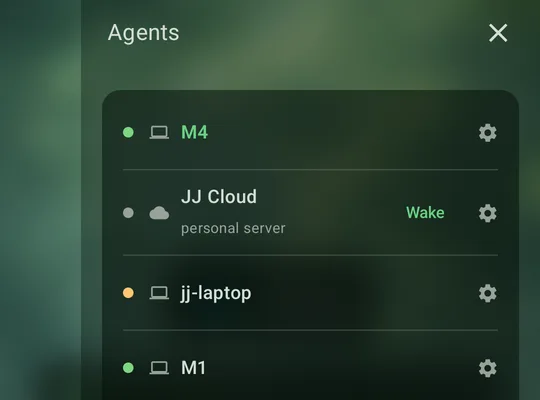
All your agents in one list
Each computer with an agent on it shows up here, with a dot that says whether it is reachable right now. Tap one to talk to it. A personal server that is asleep has a Wake button.
The path a message takes
Straight to your agent, and straight back
Your data
What lives where
- On your agent’s computer. Your conversations, your projects and your files. This is the one place they are kept.
- On your phone. A copy of your conversations, so they open instantly and you can read them with no signal. Signing out deletes it.
- With Meta-Me. Your account: who you are, which agents you have, your theme and your chosen voice. Not your conversations.
Two exceptions, said plainly. When you speak, the audio goes to Meta-Me to be turned into text, and a spoken reply comes back the same way; neither is kept. And a personal server is a machine we run for you, so your conversations sit on it. The full detail is in the privacy policy, section 4.

The thinking
A model key
Your agent thinks using an AI model from a company such as Google, Anthropic, OpenAI or DeepSeek. A model key is what lets it use one: you get it from the company, paste it into Desk once, and pay them directly for what you use. Desk shows you where to get one.

Ready?
Set up your first agent
Four steps: get the app, sign in, add a model key, and choose where your agent runs.
See the steps